Attendance, leave and homework
Mark the daily register, handle corrections and leave properly, and set, collect and grade homework, with the reports that tell you who is falling behind.
Who uses it: Class teachers and subject teachers, with the office reviewing reports.
What it handles
Daily student attendance
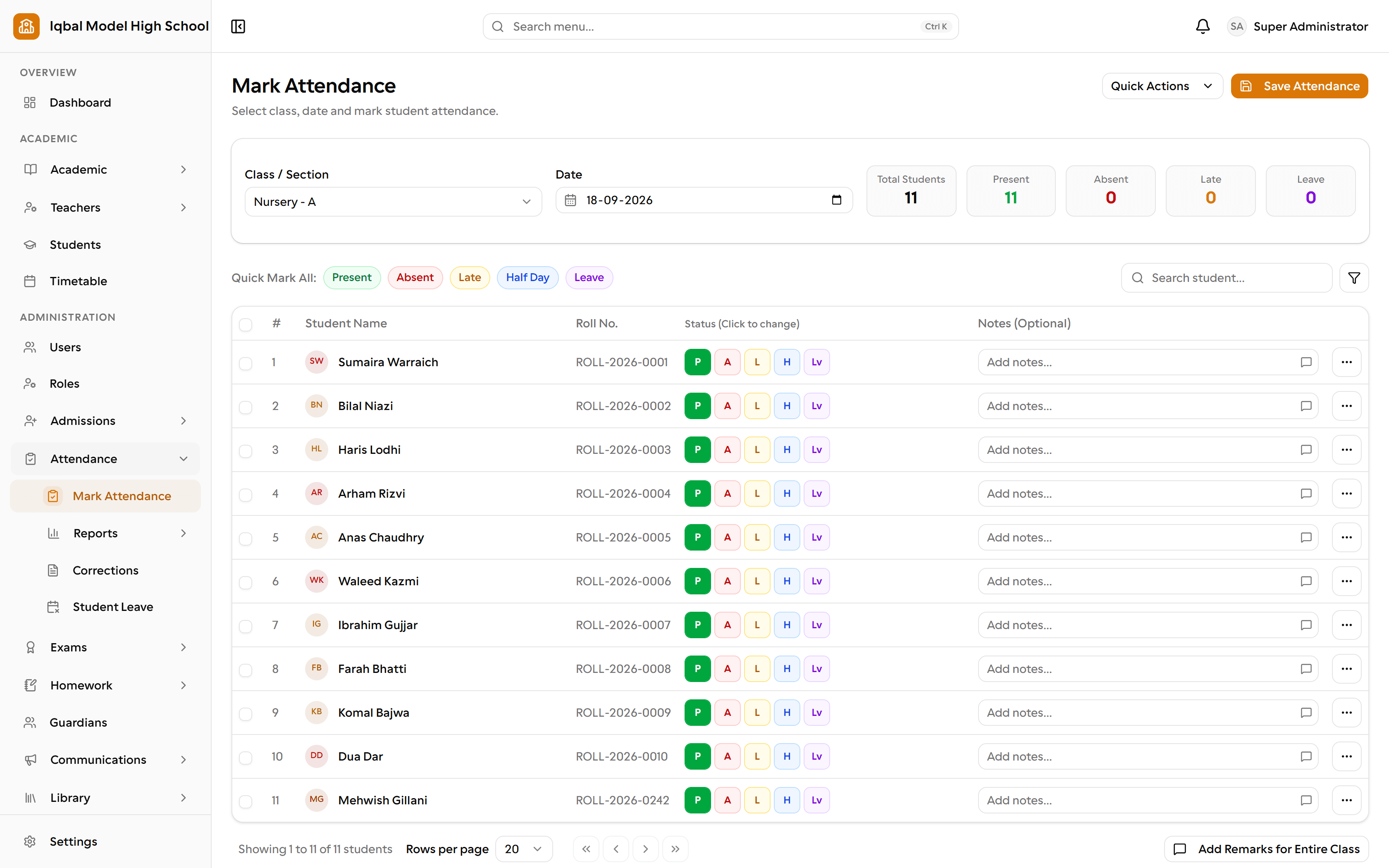
Mark the daily register for a section with present, absent, late, half day, leave or excused, plus per-student notes and bulk shortcuts.
- Attendance is marked by staff in EDUTIG. Biometric or card devices are not connected to it.
- One register per student per day; lecture-wise marking is not stored separately.
Attendance corrections with approval
A wrong mark is corrected through a request with a reason that an approver accepts or rejects, so the register is never silently rewritten.
Student leave
A parent applies for leave from their portal, a class teacher or the office approves it, and the days are marked on the register automatically.
Attendance reports
Seven ready-made reports: daily summary, monthly summary, a printable monthly register, low-attendance defaulters, session summary, class comparison and chronic absenteeism.
- Attendance percentage counts a late arrival as present and a half day as half.
Homework and submissions
Teachers set homework with attachments and a due date; students submit online and can resubmit until it is graded; late work is flagged.
Homework grading
Grade one submission at a time with feedback, or grade a whole class at once on a single screen.
Homework reports
Six reports: the homework datesheet, missing and overdue work, submission status, a per-student ledger, class and subject performance, and the grading backlog.
Secure homework files
Classmates can never open each other's submitted work, and a parent sees only their own child's files.
How the work flows
Attendance is marked
A class teacher marks the register for their own sections with bulk shortcuts and per-student notes. Marking a day as leave records a proper leave record at the same time.
Mistakes are corrected openly
A wrong mark is fixed through a correction request with a reason that an approver accepts or rejects, so the register is never silently rewritten.
Parents apply for leave
A parent applies from their portal, a class teacher or the office approves, and the approved days appear on the register without a second entry.
Homework is set
A teacher sets homework for a class and subject with files and a due date. Students and parents see it in their portals and are notified.
Work is collected and graded
Students submit online and can resubmit until it is graded; late work is flagged automatically. Grade one at a time with feedback, or the whole class at once.
The office reviews
Seven attendance reports and six homework reports show low attendance, chronic absence, missing work and the grading backlog, with export and print.
What you need first
- Classes, sections and subjects need to exist before a register can be marked.
- Teachers need their subject and class-teacher assignments, which is what scopes their portal.
How it behaves
- Attendance is marked by staff, or taken from biometric or card devices connected during setup.
- One register per student per day; lecture-wise marking is not stored as a separate record.
- Working days in the monthly reports are inferred from the days that were actually marked.
In development for this area
Being built now, not yet available. Each line says what happens today instead.
Substitutions and versioned timetables
One timetable is in force at a time today. Recording a substitution when a teacher is away, and keeping a separate timetable per term, are being built.